

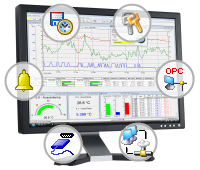
One application - hundreds of possibilities: XTR WinControl
- Automatic recording and archiving of measurement data over a long time
- Analysis with cursors and statistical functions in a line diagram
- Automatic monitoring of limits and failures
- Export live or loaded (from file) data to many other applications
- Complicated mathematical calculations, using current or stored data
- ...
Try the current Demo-Version - here!
The main functions and features
 XTR WinControl supports multiple parallel connections to different devices, using different protocols, it can export collected data for other applications, also via online transmission (OPC & MS Excel).
XTR WinControl stand for flexible Systems integration. Measurement data, curves, processes and systems can be displayed as you want and need it. With the scope of visualization of WinControl, it´s up to you.
 Capture data live - no matter if one value per hour or 50 values in a second. Capture measurement data using separate connections with different sampling rates.
 You decide what, when, how and where data are to be saved. Let XTR WinControl save data automatically regulated by timer / event or immediately. Use the optional Test Bed Manager to save data into different files simultaneously and independently of one another.
 The fully automatic Alarm monitors all measurement channels meticulously. It reports all abnormal conditions or limit violations. In addition to the screen display it is possible to switch output relays and send e-mails in case of alarm.
 The optional Password protection allows you to restrict access on the user level. A detailed set of functions and allowed actions can be define for every user.

Each dialogue in WinControl contains a Help button. Additionally, you can get help for every function of WinControl with just two mouse clicks. You do not have to read the manual - the context-sensitive help system shows the important information.